PRADHAN MANTRI SURAKSHA BIMA YOJANA (PMSBY) CLAIM FORM
This form is issued without admission of liability. It must be completed and submitted to the post office where insured holds the savings account, preferably within 30 days of the accident resulting claim..
|
1
|
Name of Account Holder(Insured person)
|
|
|
2
|
Full Address of Account Holder (Insured person
|
|
|
3
|
Name and address of Post Office and SOL ID where account stands
Savings Account Number:
|
|
|
4
|
Contact details of Account Holder (if available)
(i) Mobile/Phone number
(ii) Aadhar Number
(iii) e mail ID
|
|
|
5
|
Details of nominee (in case of death of Account holder):-
Name:
Address:
Mobile/Phone Number:
E mail ID(if any)
Aadhar Number (if any)
Bank or Post Office Account Details
Account Number
Bank or Post Office name
IFSC Code or SOL ID
|
|
|
6
|
Detail of Accident
a) Day, Date and time of accident
b) Place of accident
c) Nature of accident
d) Details of injury
e) Cause of Death
|
|
|
7
|
Name , Address and contact details of Hospital/Attending Doctor
|
|
|
8
|
State where and when a Medical or other person from company can visit the insured
|
|
|
9
|
Documents to be submitted with claim:-
a) In case of death:-Original FIR/Panchnama, Post Mortem report and Death Certificate
b) In case of permanent disability: Original FIR/Panchanama and Disability Certificate from Civil Surgeon.
Discharge Voucher
|
|
Declaration:-
I HEREBY DECLARE and warrant the truth of the foregoing particulars in every respect, and I agree that if I have made, or if shall make false or untrue statement, suppression or concealment, my right to compensation shall be absolutely forfeited. I also declare that I have not claimed the amount due under PMSBY cover on account of the above accident through any other cover under PMSBY
______________________
Signature/Thumb Impression of Claimant/Nominee
Dated _______________________
For Office Use:
Policy Number__________________________ Claim No._________________________
Certified that the information relating to Post Office Savings Account and Nominee has been verified. Premium was debited from the Savings Account on____________________ .
______________________________
Signature of Authorized Official of Post Office
Designation Stamp
PRADHAN MANTRI SURAKSHA BIMA YOJANA (PMSBY) DISCHARGE VOUCHER
Claim No.: (to be filled by Post Office) ________________________________
Policy Number:-_______________________________
Name of Post Office____________________________________SOL ID_________________
Savings Account Number_______________________________________________________
Name of Account Holder_______________________________________________________
Date of submission of claim_____________________________________________________
In consideration of approval of my claim referred above, I/We, hereby accept from National Insurance Company (NIC) the sum of Rs.__________________________(approved net claim amount) in full and final settlement of my/our claim arising out of _______________________
(accident or death) which occurred on___________________(date of loss) covered under Policy Number _____________________valid for the period from _______________ to________________.
I/We hereby voluntarily give discharge receipt to the Company in full and final settlement of all my/our claims present or future arising directly /indirectly in respect of the said loss/accident. I/We hereby also subrogate all my/our rights and remedies to the Company in respect of the above loss/damages.
Revenue Stamp
__________________________
Signature or thumb Impression of Nominee/Account Holder
Full Name:
Address:
Account No. of Nominee:
Witness:
Full Name:
Address:
———————————————————
Signature of Authorized Official
Designation Stamp.
STANDARD OPERATING PROCEDURE FOR CLAIM SETTLEMENT UNDER PMSBY
Following benefits are available under PMSBY:-
|
Sl.No.
|
Table of benefit
|
Sum Insured (In Rs.)
|
|
1
|
Death
|
2 lakh
|
|
2
|
Total and irrecoverable loss of both eyes or loss of use of both hands or feet or loss of sight of one eye and loss of use of hand or foot.
|
2 lakh
|
|
3
|
Total and irrecoverable loss of sight of one eye or loss of use of one hand or foot
|
1 lakh
|
The process followed will be as under:
Steps to be taken by the Nominee in case of death of depositor in accident:
- Nominee should approach CBS Post Office where the depositor was having the ‘Savings Bank Account’ through which he / she was covered under PMSBY and collect Claim Form, and Discharge receipt, from the Post Office.
2. Nominee to submit duly completed Claim Form, Discharge Receipt, along with the death certificate in original, FIR/Panchnama in original and Post Mortem Report.
3. Nominee has to provide his/her own Post Office Savings Bank Account details (if opened in any CBS Post Office or Nominee will first open savings account) or bank Account details (if nominee is having savings account in any Nationalized Bank).
Steps to be taken by the Depositor in case of permanent disability in accident:
- Depositor should approach CBS Post Office where the depositor was having the ‘Savings Bank Account’ through which he / she was covered under PMSBY and collect Claim Form, and Discharge receipt, from the Post Office.
2. Depositor to submit duly completed Claim Form, Discharge Receipt, along with the permanent disability certificate in original by Civil Surgeon and FIR/Panchnama in original.
Steps to be taken by the Post Office
- Upon receipt of claim form and discharge certificate alongwith documents mentioned above, the Post Office should check whether the cover for the said member was in-force on the date of his death, i.e., whether the premium for the said cover was deducted from account prior to the Member’s death.
- Post Office to verify the Claim Form & the nominee details from the relevant Finacle menu through which enrolment was made and to fill in the relevant columns of the Claim form.
- Post Office should ensure that following documents are attached with claim form:-
(i) Claim Form duly completed
(ii) Death Certificate (in case of death)
(iii) FIR/Panchnama in Original
(iv) Post Mortem report (in case of death)
(v) Permanent Disability Certificate issued by Civil Surgeon
(vi) Discharge Certificate duly completed.
(vii) Photocopy of cancelled cheque of the Nominee account (if it is a cheque account).
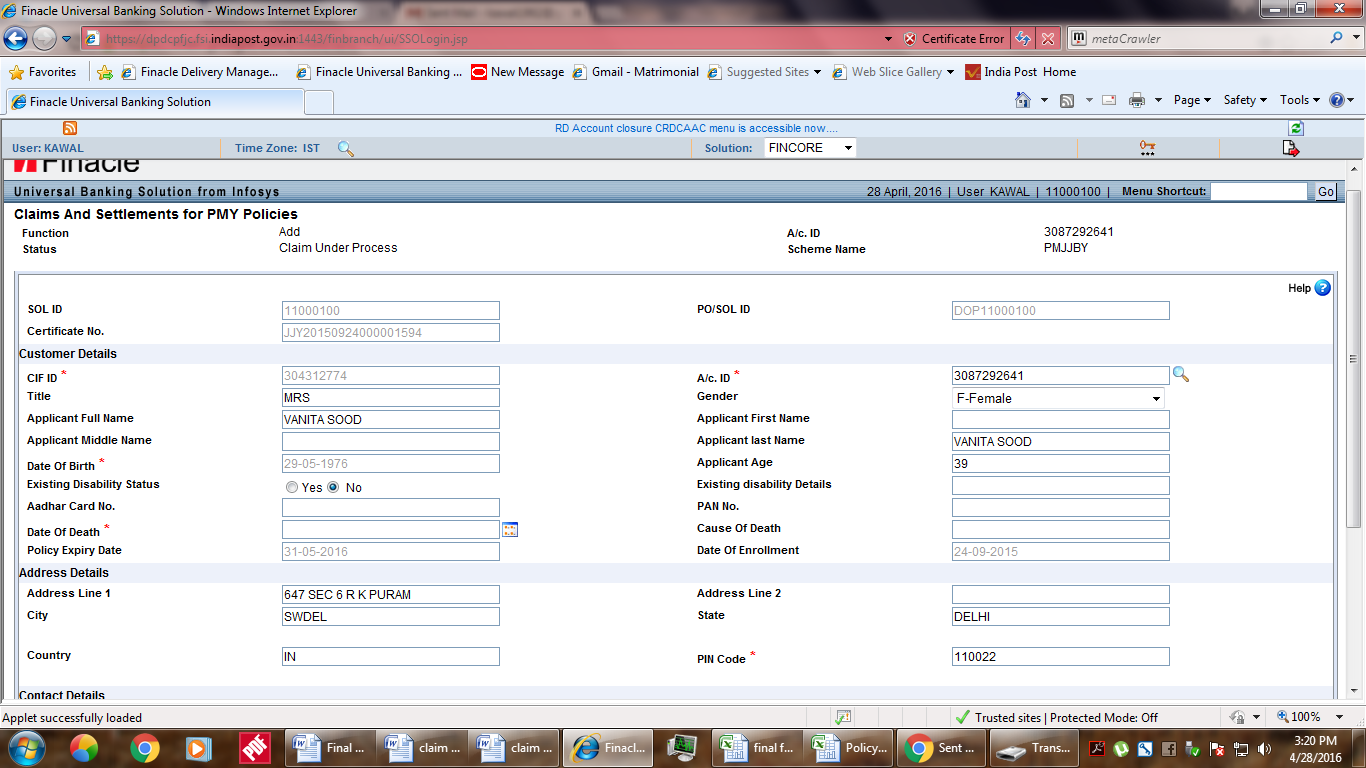
4. Post Office user will enter relevant details in Finacle menu CCSPMY
The screen shots of menu – CCSPMY
Criteria Page – CCSPMY (Claims and Settlements for PMY Policies)
In the criteria page of CCSPMY menu following functions are provided –
A – Add
M – Modify
V – Verify
I – Inquire
C – Cancel
5. Post Office User has to select the function ADD. Then enter Account ID and select the scheme as PM Suraksha Bima. Click on GO. In case of permanent disability, user will change the option of Existing Disability Status as Yeas and fill details of disability in the relevant field. Following screen will appear:-
6. User has to enter Nominee Aadhar No. (if given), Nominee Address, Nominee Mail ID (if given), Nominee Mobile Number (if given), Nominee PAN No.(if given), Nominee Bank Account (either POSB or any Bank Account), Nominee IFSC Code (if having account in Bank), Guardian name if Nominee is minor, Nominee Date of Birth (if nominee is minor), select Bank as DOP(if POSB Account) or others if other Bank Account.
7. User will click on validate and ensure that all mandatory fields are filled. It will submit documents to Supervisor.
8. Supervisor will select Function Code Verify and compare all the information filled in claim form and discharge voucher with the data filled by user. After, satisfaction, he will verify the claim. Upon verification, Claim Identification No. will be displayed by the system. This number should be noted on the top of the Claim Form and the claim register.
9. Claim Form duly filled and verified by CBS Post Office alongwith enclosures should be sent to Sr. Post Master Sansad Marg HO, New Delhi 110001 by service registered Letter. One RL should be sent even if more than one claim form is due to be sent on same day.
10. User will also maintain a claim register in which the claim shall be entered. This register has to be prepared manually by entering Date of entry of claim/Account ID/Name of Account Holder/Date of Death/Name of Nominee/Claim Identification No. (generated by system)/ Date on which claim Form sent to Sansad Marg HO/Registered Letter receipt to be pasted against claims sent on a particular date.
11. Sansad Marg HO, on receipt of claim form will enter the claim in the register to be maintained manually and designated PA of this HO will intimate System Manager for extraction of the data from Finacle for the said claim. Data extraction file will be sent to NIC by Sansad Marg HO and all the claim forms received will be sent by service Registered Parcel to the designated branch of NIC.
12. NIC, after sanctioning of the claim will push credit of the claimed amount into Bank Account of the depositor or nominee as the case may be if account stands at any Bank or Credit the funds to Sansad Marg HO Bank Account No._________________ IFSC Code_______________________
If depositor or nominee account is in any CBS Post Office. NIC will provide data file in the format of HTTUM to Sansad Marg HO. Sansad Marg HO will upload the HTTUM file in Finacle provided that funds are already received and account for the money in SB Deposit and Remittance to Bank (against credit entry received from NIC).
13. Sansad Marg HO will make entry of date of credit against the claims in the register and send intimation to the relevant CBS Post Office about the credit.
14. Relevant CBS Post Office will make entry of date of credit in its register and inform the claimant over phone about the credit. No accounting entry is to be made in any other CBS Post Office.







 Postalparivar